The phone, the inbox, the merch table, and the compliance stack — on a system that does not drop the ball. 600+ built; 500+ still running.
Missed-call follow-up, invoice and Metrc paperwork, merch and fan onboarding — production pipelines that do not drop the ball. Automation Audit $500; builds from ~$2,500.
Live production graph
READY
Swipe the canvas →
Start with the $500 Automation Audit. Credit applies to any project — automation or agentic.
Who this is for
Two lanes. Same operator.
Businesses
start at the business hub. Audience owners
start at the community offer. Or pick the room that matches your Tuesday.
Missed call → text-back → booked slot. Voice AI Receptionist plus Lead Qualify.
Floor
Invoice and PO matching, intake, support triage. Paperwork that is not the plant.
House
Content repurposing and onboarding. The show is over. The follow-up is not.
Real builds from production
What production automations still run?
Real n8n canvases — node names, branches, tool hang-offs. Not mockups. If one looks like
your bottleneck, book the audit. If you want the shelf price, open the workflow library below.
Browse 12 buildsExpandCollapse
PublishedWebhook · meeting ended·
FirefliesGrok 4Gemini 2.5 ProGPT-5Notion
One webhook turns a finished sales call into four scored analyses — SPICED, GPCTP, Discovery and BEAUT-BED — before the rep has closed their laptop.
— Four frameworks, one call, zero note-taking.
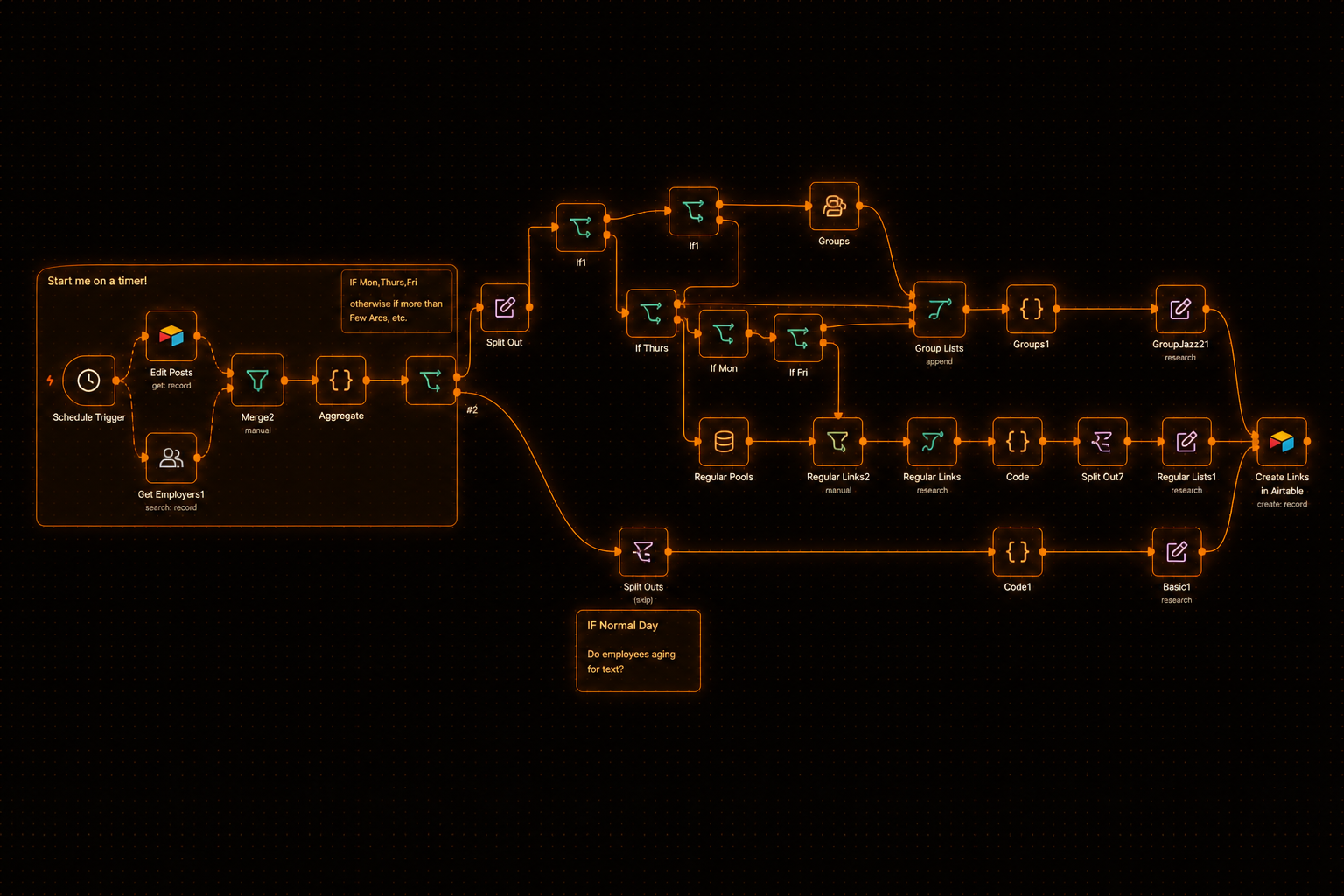
Ops · Airtable routes
Daily routes — assigned, not debated.
Timer pulls pools and techs from Airtable, branches Mon/Thu/Fri geo groups,
round-robins by pool type and skill, then writes Daily Lists.
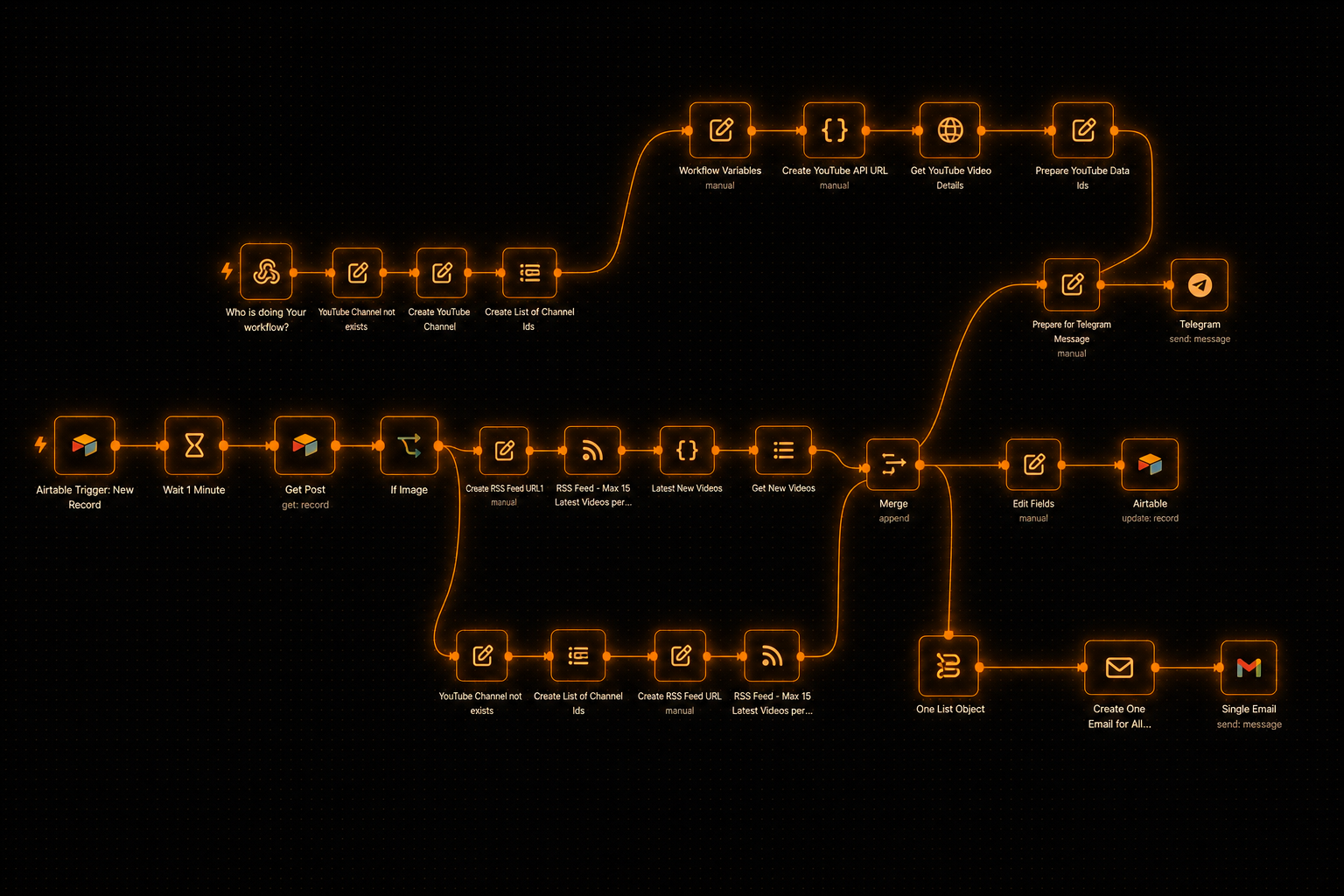
YouTube → content creation
New uploads become an archive, a ping, and a digest.
RSS watch, YouTube API enrich, Airtable upsert, Telegram per video, then OpenAI
builds one HTML email digest and Gmail sends it.
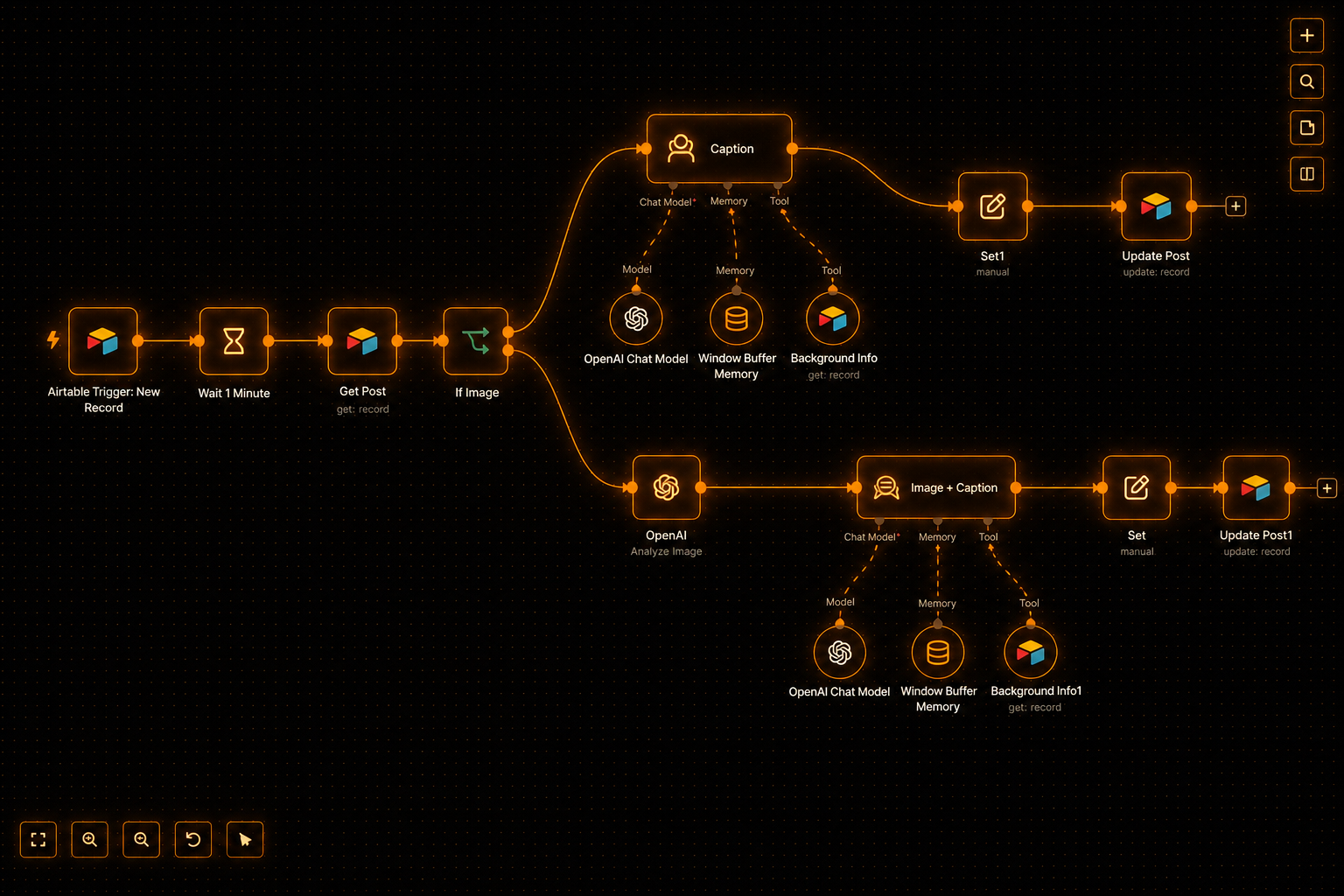
Airtable caption pipeline · production canvas
How they stay reliable
Why do most automations break?
A demo and a production pipeline are different products. These four structures ship in
every build — not as an upgrade.
01
It will not charge the card twice.
Idempotency locks. Every payload is hashed on arrival and checked before anything expensive or irreversible runs. Duplicate webhooks are a fact of life, not an incident.
02
If it fails, it waits for you instead of disappearing.
Dead-letter queues. Failures never retry inside the main thread. They park, page a human, and wait for a one-click replay.
03
When Shopify or Metrc changes a field, the pipeline pauses.
Schema contracts. A validator sits behind every external call, so malformed data does not poison the book.
04
Nothing emails a customer or moves money without a yes.
Human gates — unless you set it that way. Autonomy is a dial, not a switch.
Airtable caption pipeline · production canvas
Switches, loops, and human gates — visible.
Production posture on the canvas: branching that waits where it should, not a
straight-line demo.
Which service fits
Should I buy automation or an AI agent?
You want automation
If you can already write down every step in order — do this, then this, then this — that is automation. Cheaper per outcome when the steps are fixed, and more predictable than an agent. A big multi-workflow stack can still cost real money — cheaper does not always mean a smaller invoice.
You want AI agents
If the steps change depending on what it finds, and a person currently has to think about it before acting, that is agentic. That lives at /agentic .
Most businesses need some of both. Start with the $500 Automation Audit if you are not sure.
Reliability levels
What reliability do you get by tier?
Tier 1 already ships production posture. Higher tiers add observability, replay, and
department-scale monitoring — not a checkbox for “make it not break.”
Tier 1 Hardened pipeline
Idempotency, dead-letter queue, schema contracts, and human gates — in every build, not as an upgrade.
Tier 2 Observed and replayable
Everything in Tier 1, plus observability, replay tooling, and self-host setup so you can see and re-run failures.
Tier 3 Department scale
Everything in Tier 2, plus department-scale monitoring, deeper training, and a longer support window.
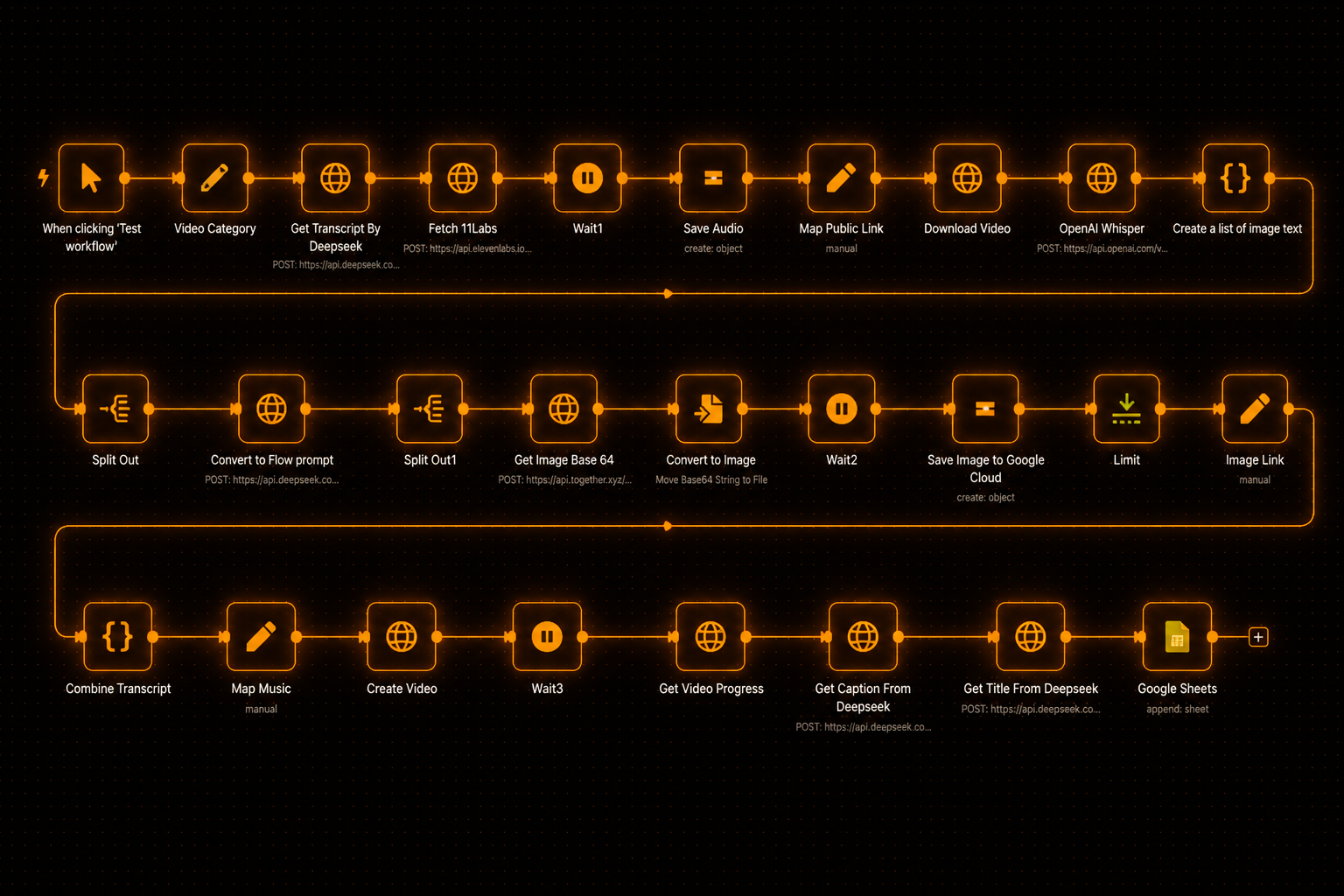
Faceless video pipeline
Reliability at scale, not a checkbox.
A multi-row pipeline that still has to survive retries, bad inputs, and the next API
change. This is the posture higher tiers buy.
Process map, go/no-go, topology, and a fixed-scope quote. If the map says agents, I offer the
$1,500 agentic pilot at /agentic — decline and the $500 still credits toward an agentic build.
Starting point
Automation Audit
I will tell you if a $2,400 workflow is dumber than hiring a kid for Saturdays.
$500One-time
Three to five business days. A process map, a clear go/no-go on what is worth automating, and a fixed-scope quote for the build.
Map the bottleneck end to end — every step a person currently touches
Systems touched: what talks to what, and where the handoffs break
Go / no-go on each candidate — what earns a build, what stays manual
Rough node topology so you can see the shape of the pipeline
A fixed-scope quote for the build, priced off what I actually saw
If the map says agents: I offer the $1,500 agentic pilot at /agentic — decline and the $500 still credits toward an agentic build
Credit terms: the $500 comes off any project — automation or agentic — no expiry
The $500 comes off any project — automation or agentic. No expiry. If the audit says you need agents, I offer the $1,500 agentic pilot; decline and the credit still applies to an agentic build.
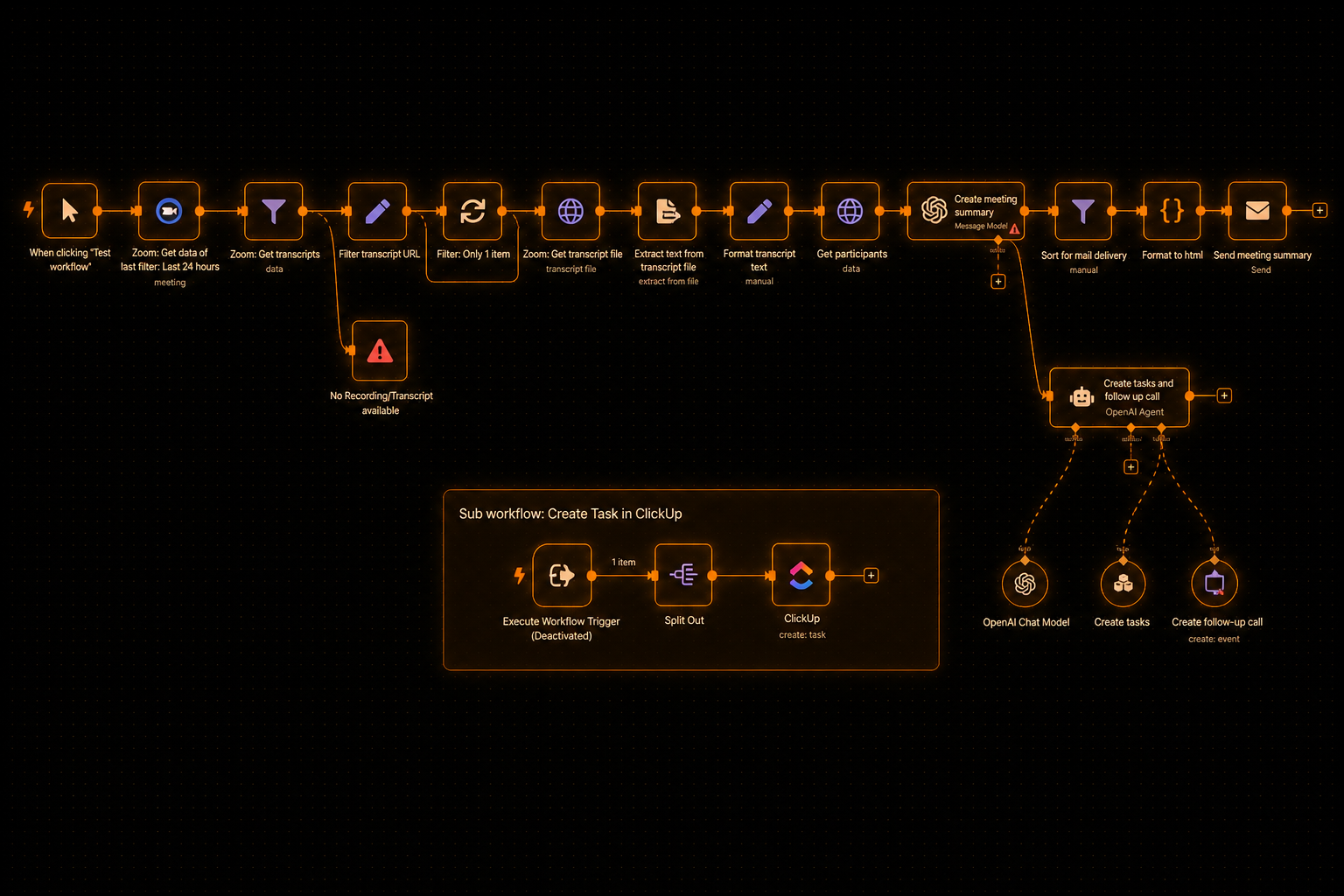
Meeting in, summary out — the manual loop that eats a morning every week.
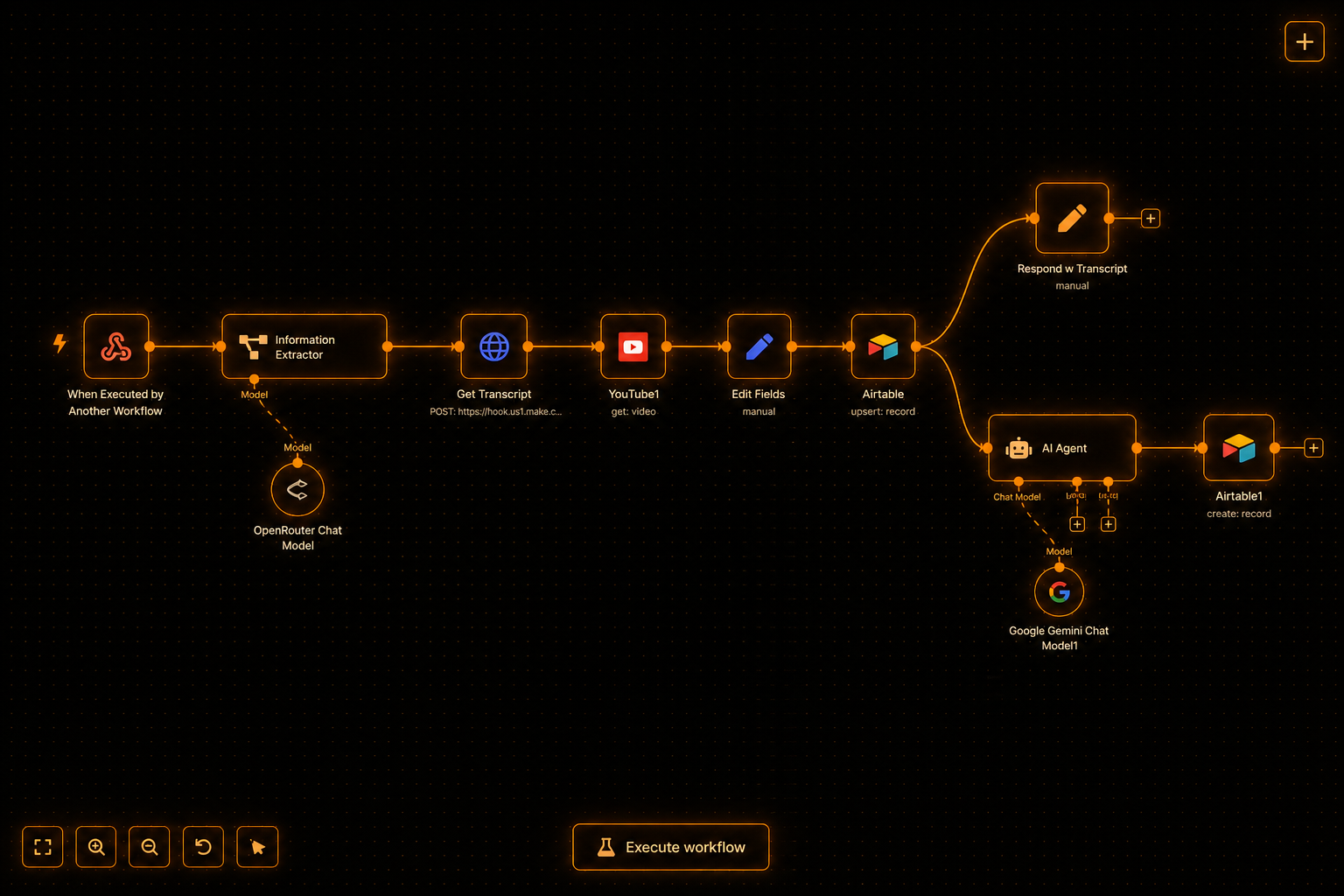
YouTube transcript tool
I ship in the editor you see here.
Full production chrome — the WOW shot for three ways to build, not a rack photo
pretending to mean something.
Builds
What are the three automation build tiers?
Builds are value-priced after the $500 audit. I will not invent a sticker price before I see
the bottleneck. You get a fixed-scope quote once the work is mapped.
Build · Tier 1
1–2 weeks
Tier 1
One fixed pipeline.
Priced on scope
One workflow, known steps, adapted to your stack. Live in 1–2 weeks.
One pipeline with a clear start, middle, and finish
2–3 systems connected — the ones that job actually touches
Idempotency, dead-letter queue, schema contracts, and human gates in every build
Weekly progress reports during the build
30 days of support after launch
Credentials setup so your accounts, not mine, own the keys
Cloud n8n or your existing instance — self-host is an add-on at this tier
Deterministic nodes by default; light AI nodes only for extract or classify when they earn keep
A multi-workflow department stack with full hardening, monitoring, and deeper handoff. Live in 4–8 weeks.
Everything in Tier 2, plus:
Multi-workflow department stack — the jobs that share data and owners
Full hardening and monitoring at department scale
Self-hosted n8n included
90 days of support after launch
Deeper training so your ops team can own day-to-day changes
When judgment shows up — branching decisions a person currently has to think through — we route that piece to Agentic. Automation stays the fixed-script work.
Smallest real builds start around $2,500. Under that, buy a ready-made workflow and we adapt it to your stack.
Scope
How do automation build tiers compare?
What changes as the tier climbs — workflows, systems, reliability, support, and handoff.
Click a column to jump to that build.
Compare tiers
Compare
Tier 1
Tier 2
Tier 3
Workflows shipped
One pipeline
2–4 connected workflows
Multi-workflow department stack
Systems touched
2–3 systems
As many as the ops stack needs
Department tool surface, mapped and owned
Reliability
Idempotency, DLQ, schema contracts, human gates
+ observability and replay tooling
+ department-scale monitoring
Support window
30 days
60 days
90 days
Self-host
Cloud or existing instance · self-host add-on
Self-hosted n8n setup included
Self-host included
AI steps
Deterministic default · light extract/classify only
AI nodes where they earn keep
Same rule · judgment work routes to Agentic
Training / handoff
Credentials + runbook so you can operate it
Team training to operate and extend
Deeper training for ops ownership
Timeline
1–2 weeks
2–4 weeks
4–8 weeks
Compare
Tier 1
Tier 2
Tier 3
Workflows shipped
One pipeline
2–4 connected workflows
Multi-workflow department stack
Systems touched
2–3 systems
As many as the ops stack needs
Department tool surface, mapped and owned
Reliability
Idempotency, DLQ, schema contracts, human gates
+ observability and replay tooling
+ department-scale monitoring
Support window
30 days
60 days
90 days
Self-host
Cloud or existing instance · self-host add-on
Self-hosted n8n setup included
Self-host included
AI steps
Deterministic default · light extract/classify only
AI nodes where they earn keep
Same rule · judgment work routes to Agentic
Training / handoff
Credentials + runbook so you can operate it
Team training to operate and extend
Deeper training for ops ownership
Timeline
1–2 weeks
2–4 weeks
4–8 weeks
Workflow library
When should I buy a ready-made workflow?
Each card is a working pipeline adapted to your stack and credentials when we set it up.
From-prices shown on the cards. Under ~$2,500, buy a ready-made workflow; custom builds
start around that floor. I have built 600+ across the book of work; 500+ are still running —
built is not the same as still running, and I keep those counts separate on purpose.
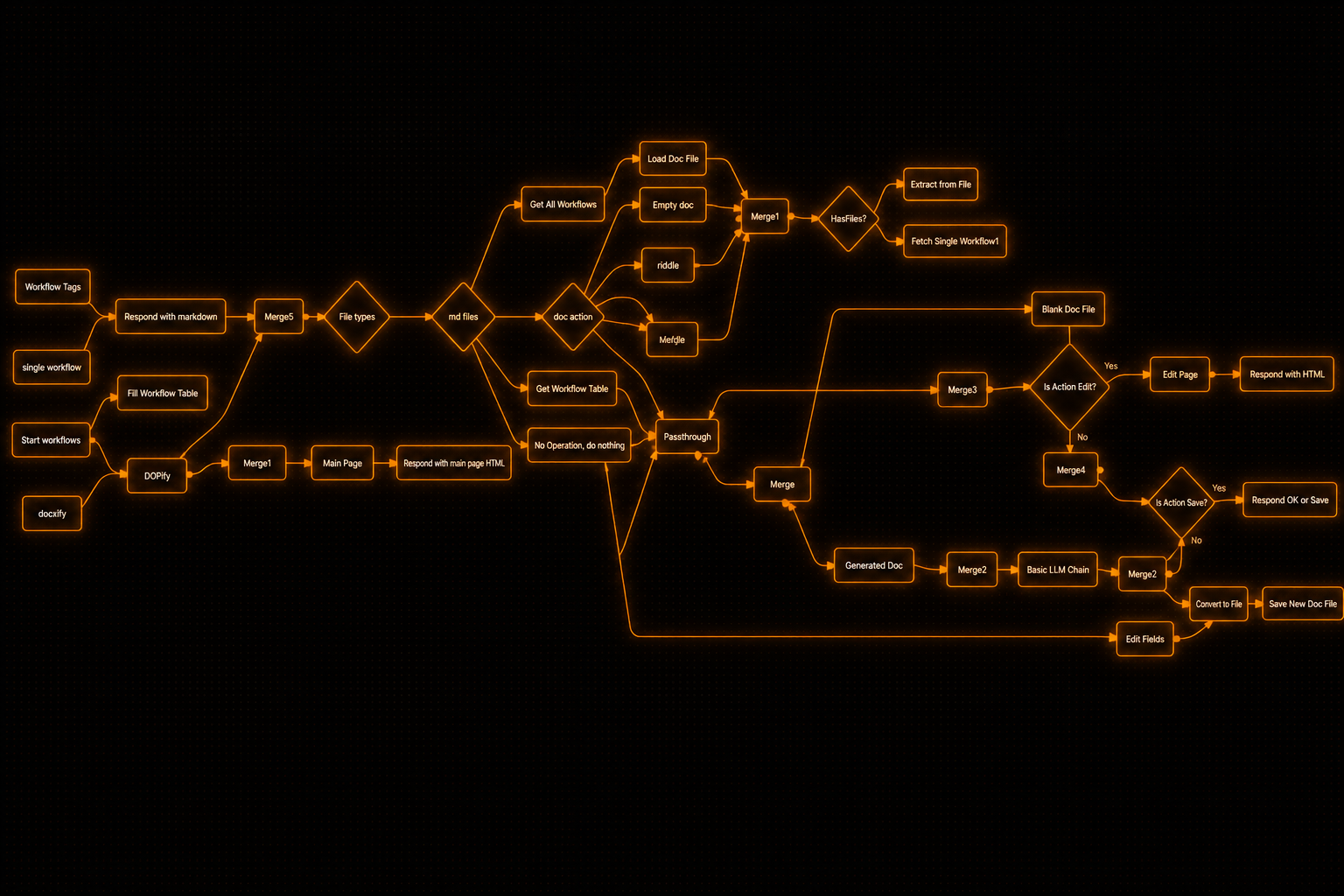
Docs / system flowchart
Curated from 600+ — the map, not the mood.
A docs and system flowchart from the shelf. This is what “off the shelf” looks like
before I adapt it to your stack.
Filter by roomFilter by job
23 shown403 nodes
Hours ranges are typical annual estimates and depend on your volume. Prices are from-figures adapted to your stack.
B-201FINANCE
Invoice & Payment Automation
Pulls invoices from the finance inbox, OCRs line items, matches POs, then schedules payment or parks the weird ones in a review queue — no more month-end PDF archaeology.
Nodes
Nodes 18
Typical monthly hours
58–78 hrs/mo typ.
Trigger
Trigger · IMAP · finance inbox
n8nGmailGeminiQuickBooksDrive
From$2,400
B-203SALES & ESTIMATION
Lead Qualify + Enrich + CRM
Bot or form qualifies; booking fires LinkedIn + web enrich into the CRM with a pre-call brief so you walk in knowing who they are and what to ask.
Nodes
Nodes 17
Typical monthly hours
44–60 hrs/mo typ.
Trigger
Trigger · Form / bot · booked
n8nTypeformCalendlyLinkedInHubSpot
From$2,300
B-206OPERATIONS
Client Onboarding Intake
Welcome → smart intake form → boards, portals, and channels provisioned → kickoff brief. Day-one setup runs itself so ops isn't babysitting every new client.
Nodes
Nodes 16
Typical monthly hours
24–32 hrs/mo typ.
Trigger
Trigger · Contract signed · welcome
n8nTypeformNotionSlackClickUp
From$2,000
B-208CUSTOMER SERVICE
Voice AI Receptionist
ElevenLabs or Vapi front desk — greets, routes, books, or takes a message when the shop's slammed. Slack gets the transcript before the call ends.
Nodes
Nodes 19
Typical monthly hours
30–42 hrs/mo typ.
Trigger
Trigger · Inbound call webhook
n8nElevenLabsVapiCalendlySlack
From$3,400
B-213MARKETING
Content Repurposing Rail
Dual ingest: Email→Many or YouTube→Many; same fan-out into posts, shorts briefs, and newsletter blocks — human approve before anything publishes.
Nodes
Nodes 18
Typical monthly hours
28–36 hrs/mo typ.
Trigger
Trigger · IMAP label · or YouTube publish
n8nGmailYouTubeClaudeNotion
From$2,200
B-202SALES & ESTIMATION
Personalized Cold Outreach
Research the prospect, write custom openers, then run multi-channel follow-up with suppression checks so the domain stays warm and the copy doesn't sound like a mail-merge.
Nodes
Nodes 20
Typical monthly hours
110–150 hrs/mo typ.
Trigger
Trigger · Sheet · list import
n8nApolloClaudeInstantlyLinkedIn
From$2,500
B-204SALES & ESTIMATION
Proposal Generation
CRM stage flip → AI-filled SOW/proposal from your rate card → e-sign → filed. Same structure every time; no blank-page proposal nights.
Nodes
Nodes 18
Typical monthly hours
40–56 hrs/mo typ.
Trigger
Trigger · Deal stage change
n8nHubSpotClaudePandaDocDrive
From$2,600
B-205SALES & ESTIMATION
Pipeline Follow-Up
Stuck-deal watcher that opens tasks, sends nudges, and suggests next-best action when a stage goes quiet — pipeline hygiene without a daily CRM stare-down.
Nodes
Nodes 15
Typical monthly hours
14–18 hrs/mo typ.
Trigger
Trigger · Cron · daily pipeline scan
n8nHubSpotClaudeSlackGmail
From$2,100
B-207CUSTOMER SERVICE
Support Ticket Triage
Classifies inbound tickets, suggests KB answers, sentiment-routes the hot ones, and auto-closes the commons so humans only touch what needs a human.
Nodes
Nodes 14
Typical monthly hours
24–32 hrs/mo typ.
Trigger
Trigger · Ticket · created
n8nZendeskClaudeNotionSlack
From$2,200
B-209CUSTOMER SERVICE
Website Support Chatbot
Site chat wired to your KB, with CRM handoff and a thread summary so the human who picks it up isn't starting cold.
Nodes
Nodes 16
Typical monthly hours
28–40 hrs/mo typ.
Trigger
Trigger · Site chat · message
n8nClaudePineconeHubSpotIntercom
From$2,400
B-210PEOPLE & HR
Recruiting Screen
Resume vs the real scorecard → screen questions → ranked shortlist → recruiter queue or talent bank. Volume without ghosting; no blank-sheet reviews.
Nodes
Nodes 21
Typical monthly hours
44–60 hrs/mo typ.
Trigger
Trigger · Application · form / email
n8nClaudeGmailAirtableSlack
From$2,800
B-211LEADERSHIP
Exec Reporting
Pulls CRM, finance, and ops into a weekly brief with anomaly flags — the three numbers that moved, not a 40-slide deck nobody opens.
Nodes
Nodes 20
Typical monthly hours
20–28 hrs/mo typ.
Trigger
Trigger · Cron · Monday 07:00 ET
n8nHubSpotStripeSheetsSlack
From$2,400
B-212LEADERSHIP
Meeting Intelligence Suite
Before = meeting prep brief (attendees, open loops, context). After = transcript analyst for decisions, actions, and framework scores. The meeting stops dying in the recording folder.
Nodes
Nodes 24
Typical monthly hours
24–32 hrs/mo typ.
Trigger
Trigger · Calendar · upcoming + transcript ready
n8nFirefliesClaudeNotionSlack
From$2,900
B-214AGENTS
Siri Assistant + Workflow Dock
Side-button voice into Notion, calendar, mail, or web search; the dock fires named n8n jobs so phone-side asks become real system actions. Hours track the tool surface — recent builds landed ~60–70 hrs/mo saved.
Nodes
Nodes 15
Typical monthly hours
60–70 hrs/mo typ.
Trigger
Trigger · Side button · voice / dock tap
n8nShortcutsNotionGmailCalendar
From$2,100
B-215AGENTS
Multi-Channel Tool-Use Ops Chatbot
One brain on Telegram, Slack, and WhatsApp with CRM, calendar, research, docs, and status tools — ops asks land in chat and leave as done work.
Nodes
Nodes 22
Typical monthly hours
40–56 hrs/mo typ.
Trigger
Trigger · Telegram / Slack / WhatsApp · message
n8nTelegramSlackWhatsAppHubSpot
From$3,200
B-216VISIBILITY
Citation Share / Prompt Panel Tracker
Runs a fixed prompt panel across ChatGPT, Perplexity, and AI Overviews every week; scores mention vs citation so you know if you're showing up or just existing.
Nodes
Nodes 16
Typical monthly hours
17–23 hrs/mo typ.
Trigger
Trigger · Cron · weekly panel
n8nClaudePerplexitySheetsAirtable
From$2,300
B-217VISIBILITY
Entity + llms.txt Drift Auditor
Crawls NAP, About, schema, llms.txt, and bios; diffs against your entity fact sheet; opens fix tickets when the story drifts.
Nodes
Nodes 14
Typical monthly hours
14–18 hrs/mo typ.
Trigger
Trigger · Cron · weekly crawl
n8nFirecrawlClaudeNotionLinear
From$1,900
B-218VISIBILITY
Answer-Engine Gap Finder
Finds ranked pages missing AI Overviews or citations, writes a gap brief, and opens content/schema tickets for the ones that actually move money.
Nodes
Nodes 15
Typical monthly hours
10–14 hrs/mo typ.
Trigger
Trigger · Cron · biweekly
n8nClaudeSheetsNotionAhrefs
From$2,200
B-219VISIBILITY
Competitor Citation Watch
Tracks who gets cited on money prompts in your category and ships a counter-brief — who won, why, and what to publish next.
Nodes
Nodes 17
Typical monthly hours
10–14 hrs/mo typ.
Trigger
Trigger · Cron · weekly money prompts
n8nPerplexityClaudeSheetsSlack
From$2,400
B-220SEO
SEO/AEO Blog Cluster Flow
Trend/cluster pick → corpus check → answer-first draft → human gate → publish. Brands the post to what you already own so you don't cannibalize yourself.
Nodes
Nodes 22
Typical monthly hours
50–66 hrs/mo typ.
Trigger
Trigger · Cron · weekly cluster
n8nClaudeSheetsNotionPinecone
From$2,800
B-221SEO
Sitewide SEO Overseer
Sitemap fan-out into sitewide, visual, and landing audits; ranked punch list back to the team. First months often run 50–100 audits; steady state is 20–30/mo — not a one-and-done crawl.
Nodes
Nodes 19
Typical monthly hours
50–90 hrs/mo typ.
Trigger
Trigger · Sitemap · fan-out
n8nFirecrawlClaudePagespeedSheets
From$2,600
B-222SEO
Schema + Technical Watcher
Cron on critical URLs for schema validity, indexability, CWV flags, and broken canonicals — ping when something that should be green goes red.
Nodes
Nodes 13
Typical monthly hours
14–18 hrs/mo typ.
Trigger
Trigger · Cron · critical URLs
n8nSearch ConsolePagespeedSlackSheets
From$1,800
B-223SEO
Internal Link + Cluster Health
Maps pillar↔spoke, flags orphans and weak hubs, emits concrete link tasks so cluster equity actually flows instead of rotting in dead ends.
Nodes
Nodes 14
Typical monthly hours
6–10 hrs/mo typ.
Trigger
Trigger · Cron · monthly map
n8nFirecrawlClaudeSheetsNotion
From$2,000
Retainer
What does an automation retainer cover?
Pipelines drift after launch. Watch protects what exists. Keep Current ships the next
workflows on a cadence. Keep Building covers department-scale ops.
Full price · cancel anytime
Refer someone who signs a 3-month minimum and you get 2 more months free. Works on any plan, and it stacks with annual.
Retainer · Watch
Retainer
Watch
Keep the pipelines honest while you run the business.
From $3,000 per month
$3,000
From $2,250 per month
25% off · 3-month minimum
$3,000
From $1,875 per month
Billed $22,500/yr · 25% off + 2 months free
Monitoring, dead-letter handling, and a small change budget so production does not rot after launch.
Uptime and error monitoring on the workflows that already ship
Dead-letter handling — failed runs get reviewed and cleared, not ignored
A small monthly change-request budget for tweaks that keep the pipeline true
No new workflow cadence at this tier — Watch protects what exists
Department-scale ops, watched and extended as the business moves.
From $15,000+ per month
$15,000+
From $11,250+ per month
25% off · 3-month minimum · priced on system size
$15,000+
From $9,375+ per month
Billed $112,500+/yr · 25% off + 2 months free · priced on system size
Multi-workflow territory with continuous build capacity. Priced on the size of the system — the numbers below are the floor.
Everything in Keep Current, plus:
Multi-workflow department stacks under continuous care
Higher change and new-workflow volume — Keep Building means the roadmap moves
Incident response when a pipeline fails outside business hours
Weekly calls, plus async when a launch is live
Optional agent supervisor territory: when judgment shows up, that piece routes to Agentic. This retainer does not smuggle agent pricing into automation.
Priced on the size of the system — the $15,000+ monthly is the starting band, not a ceiling
Logins and API keys for every system the pipeline has to touch — CRM, inbox, sheets, ERP, whatever owns the data. I build on your accounts.
API access
Working API access or a clean webhook path. If a tool has no API and no export, say so early — that changes the design, not just the timeline.
Process owner
Someone who does the job today and can walk me through the real steps, including the ugly ones. Automations fail when the map is a fantasy.
Sandbox / sample data
A safe place to test and enough real sample payloads that the edge cases show up before production. Sanitized-to-death samples hide the bugs.
One decision-maker
Someone who can approve scope without a committee. Automation builds stall on approval chains, not on node configuration.
Fast feedback
Turnarounds measured in days. I ship in the open; stalled feedback is the main thing that stretches a timeline.
Airtable caption pipeline · the deal
The deal
What are the terms before we start?
Audit credit, no expiry
The $500 Automation Audit comes off any project — automation or agentic. No countdown. You keep the process map and go/no-go either way. If the map says agents and you skip the $1,500 agentic pilot, the $500 still credits toward an agentic build.
JSON ownership
n8n workflows are JSON files you own outright. No hostage platform, no per-seat tax to keep your own pipelines running. Hand them to another developer tomorrow and they still run.
Payment
After the quote: 50/50 on smaller builds, or milestones on larger stacks. We pick the structure when scope is locked — not before.
Self-host posture
Cloud n8n is fine for Tier 1. Tier 2 and Tier 3 include self-host setup so the graph lives on your infrastructure. Credentials stay on your accounts either way.
Support by tier
30 days on Tier 1, 60 on Tier 2, 90 on Tier 3. After that, Watch / Keep Current / Keep Building if you want ongoing care.
No printed build prices
Builds are value-priced after the $500 audit. Smallest real builds start around $2,500 — under that, buy a ready-made workflow and we adapt it. I will not invent a sticker price before I see the bottleneck.
FAQ
What should I ask before buying automation?
Can this be automated?
Will this replace my CSR?
No. The Voice AI receptionist and missed-call text-back cover the hours nobody is at the desk. When someone is in the shop, the call still rings to them. The system stops the job going to whoever answered first while you were on a roof.
Does this touch Metrc?
It can sit next to Metrc and the rest of the compliance stack — invoices, intake, ticket triage. That is the paperwork that is not the plant. I do not invent a track-and-trace substitute, and I do not store shopper IDs on this studio’s form.
Can it post to my Discord / Skool?
Yes, as a rail you own. Welcome messages, abandoned merch, membership follow-up. Nothing posts live unless you set it that way. Draft is not posted — same honesty as Visibility.
Do I have to use n8n?
I ship n8n. You own the JSON. If Make is already your stack and the job fits, I will say so instead of forcing a migration for ego. Either way the files and the accounts stay yours.
What is the difference between automation and AI agents?
Automation follows a fixed script: do this, then this, then this, every time, in the same order. An agent decides its steps as it goes, because the right move changes depending on what it finds. Automation is cheaper per outcome when the steps are fixed, and more predictable than an agent. If a person currently has to stop and think before acting, that is agentic — that lives at /agentic. Most businesses need some of both.
How do I know if my process is a good candidate for automation?
If you can already write every step down in order with almost no branching, it is a good candidate. Clear inputs, clear outputs, systems with APIs or webhooks, and a person who hates doing the same clicks every week. The $500 Automation Audit is the start — process map, go/no-go, topology, and a fixed-scope quote so you stop guessing before a bigger check.
What kinds of work are bad candidates for automation?
Open-ended judgment with no clear success criteria. Jobs where being wrong once is expensive and hard to undo. Processes that change every week because nobody has written the real steps down. Tools with no API and no reliable export. If the hard part is deciding, not clicking, I will send you to Agentic instead of selling you a brittle workflow that pretends to think.
Can you automate work that spans multiple tools like a CRM, inbox, and spreadsheet?
Yes — that is most of the job. Tier 1 usually touches two or three systems. Tier 2 and Tier 3 connect whatever the ops stack actually uses. If a tool has an API, a webhook, or even a clean export path, there is almost always a way in. The audit maps which handoffs are worth wiring and which should stay manual.
Do I need n8n already, or can you start from nothing?
Either. I can stand up cloud n8n, use an instance you already have, or include self-host setup on Tier 2 and Tier 3. What matters is that the workflows end up as JSON on accounts you control. I am not going to trap your ops graph inside a black-box account you cannot leave.
Should I buy automation or an AI agent for my business?
Buy automation when the steps are fixed. Buy an agent when the steps change based on what it finds. Cheaper does not always mean a smaller invoice — a department-scale multi-workflow stack can still cost real money — but per outcome, fixed scripts beat agents when the path never branches. Unsure? Start the $500 Automation Audit. I will not upsell you into Agentic to inflate a build.
What is the $500 Automation Audit, and what do I get?
Three to five business days of process mapping: the bottleneck, systems touched, go/no-go on what is worth automating, a rough node topology, and a fixed-scope quote for the build. You keep the deliverables either way. The $500 comes off any project — automation or agentic — with no expiry. If the map says you need agents, I offer the $1,500 agentic pilot at /agentic; decline and the credit still applies to an agentic build.
How many automations have you built, and are they still running?
I have built 500-plus automations. More than 600 have shipped across the book of work; 500-plus are still running in production. Those are separate counts on purpose — built is not the same as still running, and I will not blur them. Aggregate client busywork deleted across that work sits at 35,000-plus hours saved. I do not invent per-client metrics to dress that up.
Can a small business afford custom automation, or is this only for enterprise?
Affordability tracks the pain of the bottleneck, not your headcount. A five-person shop drowning in the same weekly report is a better fit than a thousand-person company with no single painful job. Smallest real builds start around $2,500. Under that, buy a ready-made workflow and we adapt it to your stack. Start with the $500 Automation Audit if you are not sure the math works.
How do I hire Spurlock Studios for automation work?
Start the $500 Automation Audit from the contact page. From there it is me — William Spurlock — not a sales floor handing you to a project manager. Bring the process, the tools it touches, and one decision-maker. I will tell you whether you need a ready-made workflow, a scoped build, or Agentic.
What it costs
Why don't you print fixed prices for automation builds?
Because the invoice should track the bottleneck I actually see — systems touched, failure modes, self-host needs, and how messy the real data is — not a sticker I invent from a contact form. Builds are value-priced after the $500 audit. You get a fixed-scope quote before I write nodes. No printed ladder that pretends every CRM sync costs the same.
What is the minimum cost for a real automation build?
Smallest real builds start around $2,500. Under that, buy a ready-made workflow and we adapt it to your stack — fighting a custom build below that floor usually costs more in discovery than you save. The $500 Automation Audit tells you which path you are on before you buy.
Does the $500 Automation Audit fee count toward a build?
Yes — the full $500, with no expiry. It comes off any project — automation or agentic — not just automation builds in a ninety-day window. You keep the process map and go/no-go either way. If the audit says agents and you decline the $1,500 agentic pilot, the credit still applies to an agentic build.
How much do automation retainers cost per month?
Watch is $3,000 a month for monitoring, dead-letter handling, and a small change budget. Keep Current is $6,500 a month for a larger change volume and new workflows on a cadence. Keep Building starts at $15,000-plus a month for department-scale stacks — priced on the size of the system. Commit to three months and take 25 percent off. Go annual and stack that same 25 percent with two months free.
Can I get a discount if I commit to an automation retainer longer than a month?
Yes. Monthly is full price, cancel anytime. A three-month minimum takes 25 percent off. Annual takes that same 25 percent off and adds two months free — Watch lands at $1,875 a month billed annually ($22,500/yr), Keep Current at $4,063 ($48,750/yr), Keep Building at $9,375-plus ($112,500-plus/yr). Longer terms cost less per month once you know you are staying.
Is there a referral bonus on automation retainers?
Yes. Refer someone who signs a three-month minimum and you get two more months free on your own plan. It works on Watch, Keep Current, and Keep Building, and it stacks with annual. Same stacking language as the other services — you send business my way, I send months back yours.
How does payment work for automation builds?
After the quote is locked: 50/50 on smaller builds — half to start, half at launch — or milestones on larger stacks. The audit is one-time up front. Retainers bill monthly (or under the term you pick). I do not take a deposit against a mystery scope.
Do I pay for n8n hosting and API usage on top of your fee?
Yes, on your own accounts. Cloud n8n, self-hosted compute, and any third-party API costs sit on invoices you control. I do not mark those up or route them through Spurlock Studios. That is also why credentials and ownership stay with you from day one.
What is cheaper — automation or an agent — for the same outcome?
When the steps are fixed, automation is usually cheaper per outcome and easier to predict. That does not mean the invoice is always smaller — a Tier 3 department stack can still be a serious build. Agents cost more to design and to keep honest because judgment needs evaluation and oversight. I will push you toward automation when the script holds, and toward /agentic when it does not.
What if the audit says I need agents, not fixed automation?
I tell you straight and offer an upgrade into the $1,500 agentic pilot at /agentic. If you decline, the $500 audit still credits toward an agentic build — same no-expiry credit that applies to any project. You keep the process map either way; the audit is not wasted if the lane shifts.
When should I buy a ready-made workflow instead of the audit or a custom build?
Buy a ready-made when the job already matches a shelf workflow and you just need it adapted to your stack — usually under the ~$2,500 custom-build floor. Start the $500 audit when you need a process map, go/no-go, topology, and a fixed-scope quote before you commit. If you already know the scope, book a build tier scoping call after the audit — not as a free start.
How it runs
Why do you build automations in n8n instead of Make.com?
I hold all Make.com AI Automation certifications and I still ship a lot of work on Make when that is the right tool. For production graphs I own long-term, n8n wins on self-host, JSON ownership, and how the platform is moving — I collaborate directly with the n8n team. You get workflows as files on your infrastructure, not a seat tax you cannot leave. If Make is already your stack and the job fits, I will say so instead of forcing a migration for ego.
Should I run n8n in the cloud or self-host it?
Cloud is fine for a single Tier 1 pipeline when you want speed. Self-host when the data should not leave your network, when you want full control of upgrades, or when the graph is big enough that residency matters — Tier 2 and Tier 3 include self-host setup for that reason. Either way, credentials stay on your accounts and the JSON stays yours.
Who owns the n8n workflow JSON after you build it?
You do, outright. Workflows are JSON files on your instance. No vendor lock-in, no per-seat tax to keep your own pipelines running, no hostage export screen. You could hand the files to another developer tomorrow and they would still run.
What hardening is included in every automation build?
Every build ships with idempotency, a dead-letter queue, schema contracts, and human gates on anything with a real-world side effect. Tier 2 adds observability and replay tooling. Tier 3 adds department-scale monitoring and deeper training. Hardening is not an upsell — brittle happy-path demos are how automations earn a bad name.
What happens when an automation fails or a run lands in the dead-letter queue?
Failed runs get parked in the dead-letter queue instead of silently dropping. You (or I, under a retainer) review the payload, fix the cause, and replay when it is safe. Observability on Tier 2 and above makes that visible without digging through raw logs. Watch and higher retainers include ongoing dead-letter handling so production does not rot.
Do your automations use AI nodes, or only deterministic steps?
Deterministic by default. Light AI nodes for extract or classify when they earn keep — for example pulling fields from messy email. I do not glue a model onto a fixed script for marketing copy. When the job needs real judgment mid-flight, that piece belongs in Agentic, not hidden inside an automation invoice.
How long does it take to ship an automation build?
Tier 1 lands in 1–2 weeks. Tier 2 in 2–4 weeks. Tier 3 in 4–8 weeks. The Automation Audit is three to five business days before any of that. Timelines assume credentials, a process owner, and fast feedback — stalled access stretches the calendar, not a surprise invoice.
What do you need from me before an automation build starts?
Credentials, API access, a process owner who does the job today, sandbox or real sample data, one decision-maker, and feedback in days. Missing those does not always stop the work — it just means we fix access and clarity first. The $500 Automation Audit surfaces gaps before I start wiring nodes.
Can my team change the workflows after you hand them off?
Yes. That is the point of JSON ownership and training. Tier 1 ships with a runbook and credentials setup. Tier 2 and Tier 3 include deeper training so your ops team can extend what shipped. Under Keep Current or Keep Building I can keep shipping changes with you — but you are never locked out of your own graph.
How do your automation receipts compare — builds shipped vs still running vs hours saved?
Three different numbers, kept separate on purpose. I have built 500-plus automations; more than 600 have shipped across the book of work; 500-plus are still running. Aggregate client busywork deleted sits at 35,000-plus hours saved — that compounds across clients, so it is higher than any one personal hours figure and I will not pretend it is a single-client case study. Ask for the distinction if a competitor blurs built, running, and saved into one vanity metric.
Describe the manual process and the systems it touches. Start with the $500 Automation Audit —
process map, go/no-go, and a fixed quote. If the map says agents, the path is /agentic.